Currently under beta testing, Sprite Mobile Swipe works on any Windows Mobile 5.0 Pocket PC or Windows Mobile 5.0 Smartphone, and once installed, hides away in the background until activated by the device's owner.
The software cannot be uninstalled without a user selected password. If the device is ever lost, simply send a SMS from a previously specified “partner” phone and you can have the device locked. You can also go one step further, and send a “wipe” text message that will erase the entire contents of the phone, including everything on the memory card.
If, on the other hand, your phone is stolen, and the thief changes the SIM card, you will automatically get a SMS on the designated partner phone so the user will know the new number. You can also find out the recent call activity to help track your phone down.
Link
Saturday, March 31, 2007


HTC Shift.. nice laptop or phone
It's been a long time in coming, but after HTC's long, gradual feature buildup all the way from the very first Pocket PC phone in 2002, they're finally putting the "computer" in High Tech Computer by making the jump to ultraportable PC-maker. That's right, HTC's first foray into the UMPC market, the Shift (codename Shangri-La), is officially announced today. We don't yet have hard details on release date or price, but we do know it should be available in Q3 (we'd estimate for under $2,000). As for features, we know not to expect anything out of the ordinary (except lots of 3G), although the form factor is pretty notable: not too many UMPCs have a sliding keyboard, and none that we can recall have a tilting display in this orientation. Some specs:
* VIA CPU (the one we tried had a 1.2GHz chip)
* Vista business (yes, it was running Aero)
* 7-inch sliding, tiling wide-touchscreen
* 30GB drive
* Tri-band UMTS / HSDPA, quad-band GSM / GPRS / EDGE
* WiFi, Bluetooth 2.0
* Biometric reader, front-facing camera
* VIA CPU (the one we tried had a 1.2GHz chip)
* Vista business (yes, it was running Aero)
* 7-inch sliding, tiling wide-touchscreen
* 30GB drive
* Tri-band UMTS / HSDPA, quad-band GSM / GPRS / EDGE
* WiFi, Bluetooth 2.0
* Biometric reader, front-facing camera
Watch your TV from anywhere
MY-IPTV Anywhere Mobile(TM) includes Honestech's original MY-IPTV Anywhere PC server and player software and new mobile player software for mobile and handheld devices. It also includes MY-IPBOX, an external USB 2.0TV tuner device. MY-IPTV Anywhere server software has to be set up on their home computer to host content via Internet Protocol (IP) to their mobile phone or Wi-Fi enabled mobile devices and any computer via a peer-to-peer connection. The product allows users to watch and control their TV from anywhere, and includes features such as channel surfing & changing, a personal video recorder, and scheduled recording from any computer. MY-IPTV Anywhere supports the latest H.264/MPEG-4 video compression technology standard for mobile phone,handheld devices, and any computer, from anywhere in the world. Now, with MY-IPTV Anywhere Mobile and a broadband internet connection, users can transmit their favorite programming from their home based broadcast network, from anywhere in the world as long as they have their enabled mobile device.
X-series with Orb
This week I purchased the Dopod 810 from 3 and signed up for X-series, one word WOW. Thank you 3 for giving us what we want, thats right mobile data and something useful like Orb. So easy to use and spot on as to what is needed. So watch this space.
Oh as for Orb fantastic you setup the cient on your PC at home point it to which ever folders you want to share and login from any where, on your it will steam the media so you don't need to wait for it to download. You can get all types of data from your home network where ever you have internet conection, with X-seires that means everywhere.
Oh as for Orb fantastic you setup the cient on your PC at home point it to which ever folders you want to share and login from any where, on your it will steam the media so you don't need to wait for it to download. You can get all types of data from your home network where ever you have internet conection, with X-seires that means everywhere.
MS finaly gets it. Deepfish
Thats right it is all about browsing. Nokia fixed it in the s60v3, for WM5 some of us use opera. The only problem is you can not down load it. Read about it in the ink bellow.
Link
Link
Wednesday, March 21, 2007
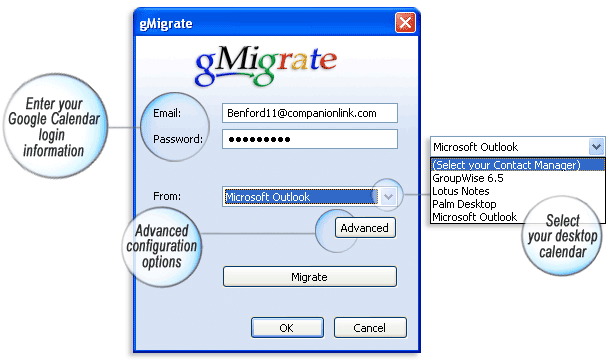
Sync your calendar to gmail
I just downloaded and tested this cool application that will synchronizes your email calendar to your gmail calender. You can read about their software at http://www.companionlink.com/ I am using the free gMigrate and it works well.
Tuesday, March 20, 2007
Mobile or is it a Laptop
Your mobile phone can be a personal computer in the near future. And that is not going to be a big surprise. Just take a look at the features that mobile phones have now and compare these mobile phones to the versions of yesteryears. You would see just how fast things are developing.

At present, many mobile phone manufacturers are already into that challenge. If you know about the HTC mobile phone from Advantage, it looks like a small laptop but you can fold it up and use it as a phone. And at Cebit T-Mobile from Germany showed off its Ameo which is a mobile phone with a screen measuring 13 centimeters and comes with a drive with 8 gigabytes. The time has come that mobile phones have turned into PCs, I do not mind it at all.

Saturday, March 17, 2007
WM to support USB host

Seiko Epson Corp. (Epson) is developing sample Windows CE 6.0 drivers for its S1R72V family of high-speed USB2.0-compatible controller chips. The first such driver, for the S1R72V17 controller chip, is now available, the company says.The S1R72V17 is a low-power USB2.0 interface controller that implements both host and device functions. The device supports USB2.0 data transfer rates of "HS" (480 Mbps), "FS" (12 Mbps), and "LS" (1.5 Mbps), for both host and device function operation, according to Epson.This sample driver is unique in that it can be connected to a mouse, keyboard, hub, and to storage equipment in order to effortlessly set up a development environment on a CEPC device, eliminating the need to establish a specialized development platform environment. By launching this new sample driver for Windows(R) Embedded CE 6.0, Epson has further expanded its lineup of sample drivers for USB controller LSI products in an effort to support customers in their development activities.
Key features of the driver, as listed by Epson, include:
1) USB2.0 host functions
- Supports HS (480 Mbps), FS (12 Mbps), and LS (1.5 Mbps) transfer rates
- Supports control, bulk, and interrupt transfer
- Compatible with CEPC PCI bus
- Compatible with test mode
- Supports multichannel
- Supports mass storage class
- Supports hubs (compatible with multistage connection)
- Supports HID
- Supports CDC
2) USB2.0 device functions
- Supports HS (480 Mbps), FS (12 Mbps), and LS (1.5 Mbps) transfer rates
- Supports control, bulk, interrupt, and isochronous transfer
- Supports Endpoint 0 in addition to five general Endpoints (for bulk/interrupt/isochronous transfer)
- Compatible with CEPC PCI bus
- Compatible with test mode
- Supports serial class (ActiveSync can be used)
- Supports mass storage class
TiVo Launches Remote Scheduling With Verizon Wireless
TiVo and Verizon Wireless today announced the availability of TiVo Mobile scheduling, a downloadable application available only through Verizon Wireless.TiVo Mobile scheduling allows subscribers to purchase the mobile service through select Verizon Wireless handsets and schedule recordings on their TiVo Series2 or Series3 TiVo boxes.
TiVo and Verizon Wireless bring consumers the convenience of scheduling television recordings while away from the living room. Whether you are away from home or discussing TV at the water cooler, all that is needed is a select Verizon Wireless Get It Now-enabled handset to schedule recordings on your TiVo box.
TiVo Mobile scheduling uses the award-winning TiVo interface to give subscribers the ability to easily search for and browse through listings to find shows that they want to record. Subscribers to the TiVo Mobile scheduling service will also have access to premium entertainment content that is updated daily, including a customizable channel lineup, the most popular and most recorded shows and a current list of recommendations from TiVo.
TiVo and Verizon Wireless bring consumers the convenience of scheduling television recordings while away from the living room. Whether you are away from home or discussing TV at the water cooler, all that is needed is a select Verizon Wireless Get It Now-enabled handset to schedule recordings on your TiVo box.
TiVo Mobile scheduling uses the award-winning TiVo interface to give subscribers the ability to easily search for and browse through listings to find shows that they want to record. Subscribers to the TiVo Mobile scheduling service will also have access to premium entertainment content that is updated daily, including a customizable channel lineup, the most popular and most recorded shows and a current list of recommendations from TiVo.
Nokia steps closer to to WIMAX network in the USA
Since the announcement in January, things look to be moving fast as they have announced that "Sprint Nextel has awarded it the four Texas markets of Dallas, Fort Worth, San Antonio and Austin for the initial build-out of Sprint Nextel's mobile WiMAX network."
"Nokia will deploy WiMAX infrastructure, including the Nokia Flexi WiMAX Base Station, at sites throughout the four Texas markets, enabling Sprint Nextel to deliver wireless Internet broadband access to consumers, businesses and governments. Service is expected to commence in the Texas markets during the first half of 2008. Sprint Nextel's mobile WiMAX network intends to cover 100 million people nationwide by the end of 2008."
Link
"Nokia will deploy WiMAX infrastructure, including the Nokia Flexi WiMAX Base Station, at sites throughout the four Texas markets, enabling Sprint Nextel to deliver wireless Internet broadband access to consumers, businesses and governments. Service is expected to commence in the Texas markets during the first half of 2008. Sprint Nextel's mobile WiMAX network intends to cover 100 million people nationwide by the end of 2008."
Link
Saturday, March 10, 2007
gSyncit for Microsoft Outlook
gSyncit works by updating your Microsoft Outlook calendar with your Google calendar entries and then updating your Google calendar with your Microsoft Outlook entries. All appointments that occurred in the past 365 days and those that will occur in the next 365 days will be synchronized
Link
Link
Wednesday, March 07, 2007
Windows Mobile 6 SDK Now Available for Download
"The Windows Mobile 6 SDKs add documentation, sample code, header and library files, emulator images and tools to Visual Studio that let you build applications for Windows Mobile 6. With Windows Mobile 6, we are revising our SKU taxonomy and naming to better align our brand and products with the realities of today’s mobile device marketplace. The historical form-factor based distinction between Windows Mobile powered Smartphone and Windows Mobile powered Pocket PC Phone Edition is blurring dramatically. We want our taxonomies and terminology to evolve to better reflect the evolution of the mobile device industry."
link
link
Google released a Google Maps client for Windows Mobile
Google released a Google Maps client for Windows Mobile that installs from a CAB file that can be downloaded and installed directly from Google (no need to sync with a PC). It is also a native application. No Java Midlet needed. This means it is fast and looks good on a Windows Mobile device. I tested it and the satellite image view looks nice and clear on its screen and the menu looks like most other native applications.
You can download it directly to your device from: http://google.com/gmm/
The application can also show a traditional looking street map, locations of businesses, real-time traffic for certain cities, and driving directions. I’m very impressed by what I’ve seen. I hope we see more native Windows Mobile apps from Google in the future.
Wednesday, February 28, 2007
E-mail best practices
These days, e-mail is used by just about everyone. Unfortunately, a lot of users out there don't use it right, flirting with security risks, consuming excessive bandwidth, and practicing lousy etiquette. Here are some basic e-mail usage guidelines to help your users handle their e-mail responsibly and to safeguard your organisation.
1. Prevent virus outbreaks and spam
Viruses are often spread through e-mail. You can greatly reduce the spread of e-mail viruses by using antivirus software, using only e-mail services that offer automatic antivirus protection (such as AOL, Google, Hotmail, and Yahoo), opening e-mail only from trusted sources, opening only attachments you're expecting, and scanning attached files with antivirus software before opening them.
Spam is loosely defined as unsolicited bulk e-mail and loosely correlates to the junk mail that turns up in your home mailbox. But spam represents more than unwanted clutter. It clogs e-mail accounts -- and networks and servers -- while trying to sell products, spread jokes, or propagate Internet hoaxes.
Reduce the amount of spam you receive by being cautious where you post your e-mail address. Avoid publishing your e-mail address on Web sites or submitting it to every site or organisation that requests it.
Never forward chain messages, which often reveal coworkers' and colleagues' e-mail addresses to other parties. Use caution when accepting e-mail offers or agreeing to accept mailings from vendors; subscribe only to Web sites and newsletters you really need and consider creating a generic Hotmail or Yahoo e-mail account for these subscriptions.
Don't open unsolicited e-mail. If you accidentally open spam, don't click links offering to unsubscribe or remove you from the mailing list unless the sender is a trusted vendor.
2. Avoid phishing attacks
Phishing scams are designed to steal consumers' personal information. They often use doctored and fraudulent e-mail messages to trick recipients into divulging private information, such as credit card numbers, account usernames, passwords, and even tax file information.
Online banking and e-commerce are generally safe, but you should always be careful about divulging personal and corporate information over the Internet. Phishing messages often boast real logos and appear to have come from the actual organisation, but those messages are frequently nothing more than copyright infringements and faked addresses. If you suspect a message possesses any credibility, you are much safer calling the company directly -- preferably at a telephone number printed on a paper statement or invoice -- and talking to an authorised representative.
3. Manage your Inbox
Sort messages by priority, subject, date, sender, and other options to help find important e-mail that requires your attention. Proper e-mail etiquette dictates that you respond to all e-mail in a timely fashion. Generally speaking, you should respond to all professional e-mail within a business day, even if it's just to say you've received the message and will look into the matter. Occasionally, you may receive an e-mail thread that contains responses from several people; always read the entire thread before responding.
4. Compose professional messages
It's easy to convey the impression that you're unprofessional or careless if you don't follow some basic principles of good business writing. Make sure you follow proper grammar and sentence structure when composing and responding to messages and use a spell checker. Don't type in all capital letters -- it creates the effect of shouting. Break your message into paragraphs for logic and readability.
Before clicking the Send button, give it a final once-over. Reread the entire e-mail, checking it for grammatical errors, punctuation mistakes, and typos. You'll be amazed at what you catch. Also make sure your tone is appropriate for the message.
5. Write effective subject lines
Writing subject lines can be tricky, but you should always include one. The goal is to summarise the message without being too wordy or too vague. Long subjects tend to be skimmed or ignored, and they don't always fully display in e-mail viewers. For best readability, use sentence case for subject lines rather than all caps:
Agenda for meeting on 3/29/07
Not
AGENDA FOR MEETING ON 3/29/07
6. Properly use CC and BCC
The carbon copy (CC) and blind carbon copy (BCC) features found in most e-mail clients allow you to send copies of an e-mail to others you need to keep informed but who aren't necessarily the primary recipients.
When copying others, be certain the e-mail message pertains to them. If you use e-mail address lists, verify that all of the members of the list should receive the e-mail, too, and remove those who don't need to be included. And use the BCC feature sparingly. If sensitive topics require BCCing others, it may be best to take the matter offline and discuss it in person.
7. Obey etiquette rules when forwarding messages
Before you forward an e-mail, make sure that all recipients need to receive the message. In addition, be careful when forwarding sensitive or confidential information. Never forward proprietary information to external audiences or to unauthorised recipients. Before clicking the Send button, review whether a message's contents are appropriate for each listed recipient.
8. Don't be a party to a flame war
Flame wars are heated e-mail exchanges that are more emotional than reasoned, and they have no place in professional communications. If you receive a flame or suddenly find yourself in a flame war, take a little time before responding, if you respond at all. Think about the situation and reply rationally not emotionally.
You may also decide not to reply but to deal with the issue in person. Often, flame wars are started because of a simple misunderstanding. An ill-phrased comment (or even a well phrased one) can be misconstrued by a recipient, who then fires off a salvo in response. Instead of replying, go talk to the person and discuss the message. If talking with the person doesn't end the problem, involve a manager for assistance in resolving the issue offline.
9. Protect e-mail addresses
Don't divulge your coworkers' e-mail addresses to vendors, friends, or others outside the organisation. Verify that recipients listed in the To and CC fields should be receiving messages and that you won't be revealing others' e-mail addresses in the process. Don't post your or coworkers' e-mail addresses on Internet forums or bulletin boards, on Usenet groups, in chat rooms, or in other public areas.
Here are a couple of simple ways to help keep others' e-mail addresses private. First, use the BCC feature when you need to hide their e-mail addresses from external audiences. Second, delete their addresses from messages you forward. It takes only a few moments and will reduce the chances of coworkers' e-mail addresses proliferating in the wild.
10. Be smart about handling attachments
E-mail attachments consume inordinate amounts of e-mail server space and network bandwidth and are often the culprits behind virus outbreaks -- but they're often the easiest way to transfer files. Just be sure to follow these guidelines when e-mailing attachments:
- Don't attach large files to an e-mail; anything over one or two megabytes shouldn't be sent via e-mail.
- Limit the number of files you attach to a message to five or fewer.
- Save attachments to your hard drive and then delete the e-mail message containing the attachment.
- Don't open unexpected attachments or those sent by unknown parties.
- Always scan files with an antivirus program before opening an attachment. Never click an attachment without first confirming that it's virus-free.
- Don't annoy recipients by forwarding attachments they can't access. If an attachment requires a new or less-common application, say so in your message.
11. Don't include sensitive or potentially embarrassing information
Don't make the mistake of thinking your e-mails are private. They're not. Think of them as postcards. You should never include any information in an e-mail that you wouldn't want published on the front page of your local newspaper. In other words, never send confidential, proprietary, sensitive, personal, or classified information through e-mail. You should also refrain from making inflammatory, emotionally charged comments in e-mail.
12. Know when to use e-mail (and when not to)
Businesses provide e-mail for professional, business-related use, not for jokes, gossip, or chain e-mails. Also remember that you shouldn't send an e-mail to do a conversation's work. Complicated subjects are often difficult to explain face to face, much less in an e-mail. Instead of firing off a complicated explanation via e-mail, set up a short meeting to address the issue in person.
E-mail is also a poor stand-in for conversation when conducting critical, difficult, and/or unpleasant discussions, such as issues related to human resources matters. Touchy communications are best handled in person.
Friday, February 23, 2007
Steps to create better meeting
Given our love for meetings, we need to make them more effective. Having recently “enjoyed” several truly pointless meetings, I know there’s a better way.
- Make sure the meeting has a clear purpose. If I could scream this, I would: “What is the purpose of this meeting?” If you can’t define the purpose clearly, or you’re obfuscating it in order to get me into the meeting then shame on you.
- Avoid suspense. There’s no place in meetings for suspense. Whether you’re delivering bad news or good news - just get to the point. You can explain all the circumstances of your news after the fact, but don’t keep people sitting around waiting.
- Document what’s going on. The best thing about a meeting is not remembering what was talked about 5 minutes after it was finished. I suppose to avoid pointless meetings I could say, “be remarkable and memorable” but barring that, pick one person as secretary and have them distribute their notes later on.
- Avoid distractions. Every meeting has at least one guy that’s distracted by something. He’s looking at his computer screen, staring out the window, signaling to people walking by the conference room, or picking his nose. Boot his butt out of there, he’s Mr. Pointless Meeting.
- Have an agenda. This won’t work for impromptu meetings, but an agenda is a very good way to keep people on track. Distribute it beforehand. Don’t ask for everyone’s approval. If you do, and don’t get it, you’ll have a harder time following the agenda. Agendas are an opt-out effort; if someone doesn’t put in suggestions or request changes (or respond in any way) they’ve - by default - accepted the agenda.
- Avoid regular meetings if there’s no agenda. Following point #4, if you’re having a regular, weekly meeting but there’s no agenda, why have the meeting? If you say “habit” then poke yourself in the eye. Meetings aren’t meant to satisfy your need for organization and habitual, mindless behaviors; they’re there to solve problems.
- Schedule something critical right after. If you have the sense that a meeting may be pointless schedule something important right after. Tell the attendees as soon as you get in there, so you’ve got an escape route setup. You could always fake it, or even have someone call you during the meeting to get out, but it’s much more effective if you legitimately have to move on. It’ll help you keep others focused, moving through the agenda and accomplishing something.
Wireless doorbell rings you in
After testing the technology in its home Dutch market, wireless startup Waleli now plans to sell its GSM Doorbell internationally, beginning in northern Europe, the company said Tuesday.
Link
The wireless doorbell allows apartment dwellers, home owners, and small businesses to answer their doorbell, talk to visitors, and even open the door remotely with their GSM phones.
The GSM Doorbell consists of four parts: an intercom, an electronic lock, a GSM-enabled doorbell, and a SIM (subscriber identification module) for the GSM device.
When someone presses the doorbell device, it rings your handset, allowing you to communicate with visitors and, by entering a pincode, to grant them access to your home, all without having to leave your location.
The technology can be useful when dealing with delivery people, door-to-door solicitors, and many others who need or want to stop by. And you don't have to worry about locking yourself out of the house or apartment again because the machine will recognize your mobile's number and unlock the door for youLink
Wednesday, February 21, 2007
Google VP: Mobile phones the future of the Internet
The future growth of the Internet lies in the hands of mobile phone users, not computers, according to Google Vice President Vinton Cerf. Speaking in Bangalore, India this morning, Cerf said to reporters that while the Internet population has exploded from 50 million to 1.1 billion since 1997, it still only reaches a sixth of the world's population.
The only way to reach the remaining 5.5 billion people on the planet will be to make it more affordable to access the Internet, according to Cerf. Internet access via mobile phone has been slowly gaining momentum in developed countries—over 50 percent of those surveyed toward the end of 2005 had used at least one data service on their phones. However, such mobile access could be the key to quickly getting large populations in developing countries online due of the marginal cost of a mobile phone compared to a computer.
Friday, February 16, 2007
Explore the world with free maps on your mobile
A nice software offering from Nokia, the charging model will be in conjunction with operators, they will charge a subscription for turn-by-turn directions.
Link
Link
Friday, January 26, 2007
Vista Windows Mobiles Device Center Walk Through
Chris Leckness is walking us through the Windows Mobile Device Center in Windows Vista.
Link
link to device centre Software
Link
link to device centre Software
Subscribe to:
Posts (Atom)