So do I with VOIP take your phone every where..
read more | digg story
Wednesday, May 23, 2007


HTC takes a gamble with new brand and OS strategy
Despite making gains in the enterprise and becoming a fairly robust and well recognized, if relatively minor, smartphone platform, Windows Mobile will clearly be just an element in the mobile picture, and probably a small one compared to Linux and the growing family of Java-oriented OSs like Symbian/Series 60 or Sun's new developments.
read more | digg story
read more | digg story
Mobile TV will reach 244 million by 2011, says report
TV enabled handsets will reach a staggering 244 million devices by 2011, according to a new report.
This is almost double the number previously forecast, and was reached by a detailed look into the likely mobile TV launch dates and the uptake rate expected in 55 countries.

The report was published in the US by Multimedia Research Group, but was written by Rethink Research Associates in the UK. It shows the rapid increase anticipated in handsets annually, with huge leaps during 2009 especially (see graph below), when 53 million broadcast TV enabled handsets are expected to ship.

"There are over 80 mobile TV trials all over the world and already there are a handful of services launched. The bulk of those trials are already committed to turn into genuine services, in some cases with a nationwide footprint, in other countries in limited regions," said report author Peter White, principal analyst at Rethink.
"This forecast is not including video services which are streamed over a cellular network, because that has largely been a slow burn business, due to its low screen resolution and the careful management it needs so that it doesn't interfere with voice. Most of these new handsets will deliver QVGA quality screens, where voices and lips are synchronised, where there is no shadowing on the screen, and where the resolution is good enough to watch for 30 minutes at a time and beyond," White said.
Initiatives in Japan and South Korea have been launched for some time using technologies which are largely unfavoured in the rest of the world, but last year Italy launched two DVB-H based services and now Qualcomm's MediaFLO is aggressively going after the US market with deals that take in Verizon Wireless and AT&T as resellers.
Around 80 pilots have been carried out globally and the trickle of current services will reach a torrent of some 50 to 60 services during 2009, led by developments in China and Asia Pacific, where the report says 105 million handsets will ship. It says this will be followed by strong showings in Western Europe and the US, which will ship 73 million and 40 million mobile TV capable handsets by 2011 respectively.
According to the report, service revenues from the global mobile TV market will exceed $24bn annually by 2011, with Western Europe likely to lead in revenue terms at over $10bn, followed by the USA and Canada at $7.7bn, and China and the Far East lagging at $5bn, despite higher usage levelsMillions of Chinese Hit by Symantec Foul-Up
Symantec virus signature disabled critical system files in Chinese PCs, crippling Windows XP for millions of users.
read more | digg story
read more | digg story
Monday, May 21, 2007
Saturday, May 19, 2007
Top Ten Sources of Interruptions
In no particular order, here are the top ten interruptions we see most often with our clients that are affecting their productivity. - lifehack
read more
read more
Wednesday, May 16, 2007
What I Learned
If it’s any help to other entrepreneurs
- Make no assumptions when it comes to roles and responsibilities. “Someone’s gotta call quittin’ time.”
- Communication between partners is mandatory. And you cannot communicate with someone who is not communicating with you.
- Decisions aren’t decisions if you have to keep making them. Set on the course and stick to it. If you keep talking about things that have already been decided, nothing will ever get done.
- When someone says one thing, but acts in a contradictory way, you have a choice between believing their words or believing their deeds. Believe their deeds.
- Never let anyone tell you what you want. When someone says, “You don’t want that,” what they really mean is, “I don’t want you to have that.”
- Don’t stay where you’re not wanted, respected, or happy. Even if it’s your company.
Shaping the Future
Charles Stross talks about his personal predictions when it comes to the next 20 years of Technology, What it will bring us, limitations and expectations.
read more
read more
Shortcuts for Special Gmail Labels
In Gmail every built-in view (e.g.: inbox, trash, read mail) is actually a label. So if you want to view all the unread messages from the inbox, you could search for: label:inbox label:unread.You can combine these built-in labels with your labels and create interesting queries. But these queries can become long and hard to write. Fortunately, you can replace label with l and everything with still work fine. The previous query will become: l:inbox l:unread.If you still think the query is too long, Gmail has shortcuts for the special labels.
^b chats
^f sent mail
^i inbox
^k trash
^r draft
^s spam
^t starred messages
^u unread mail
That means our query could become: l:^i l:^u. What about all the unread messages that aren't in the inbox? Search for: -l:^i l:^u.
read more
^b chats
^f sent mail
^i inbox
^k trash
^r draft
^s spam
^t starred messages
^u unread mail
That means our query could become: l:^i l:^u. What about all the unread messages that aren't in the inbox? Search for: -l:^i l:^u.
read more
Saturday, May 12, 2007
Comparing 5 Ways to Tag Videos
There's so many videos flying around online these days and both thesheer number and impact of those videos are only going to increasewith time. Video tagging tools let you archive and share favorites,subscribe to video tag feeds in iTunes or display tagged videos on awebpage using SplashCast..
read more
read more
Friday, May 11, 2007
Bored Mathematician Discovers An Unusual Numerical Pattern While Doodling
The Ulam spiral is a simple method of graphing the prime numbers that reveals a pattern which has never been fully explained. It was discovered by the mathematician Stanisław Ulam in 1963, while doodling on scratch paper at a scientific meeting. Ulam, bored that day, wrote down a regular grid of numbers...
read more
read more
Wednesday, May 09, 2007
Learn to Ruby: 74 Quality RoR Resources and Tutorials
As is the case with any language, learning Ruby on Rails from scratch can be quite a pain. Here is a compiled a list of the best Rails resources the Web has to offer, covering installation (both manual and automatic, plus web hosts), tutorials (beginner and advanced topics), books, blogs, forums, cheat sheets, code snippets and API documents.
read more
read more
Ultimate Web 2.0 Layer Styles - Free Download
Photoshop Layer Styles are the easiest way to speed up the design process. Here is a set of 100+ Photoshop Layer Styles created in .ASL ( Photoshop Layer Style ) format.
read more
read more
DIY Electric Bicycle
Learn step by step exactly how to make your own electric bike. Although it isn't that stylish, it will will save you thousands in gas money!
read more
read more
IPv6 firewalling knows no middle ground
The need to have several computers share a single IP address means that today's home routers perform some basic firewalling. Applications have learned to overcome the problems this creates over time. With IPv6, all these problems-and their fixes-will disappear, but they come back with a vengeance when people need to setup IPv6 firewalls
Link
Link
Tuesday, May 08, 2007
Absolutely HUGE List of Color Related Sites!
Someone put together a list of just about every color related resource (worth mentioning) in the known universe. Designers rejoice!
read more
read more
Ubuntu Mobile and Embedded Edition announced
Ubuntu Mobile and Embedded Edition is aimed at "small, handheld, graphical tablets which are Internet-enabled", and will be developed together with Intel.
read more
read more
100+ Ubuntu Tutorials and Growing Fast!
How to do practically anything with it. As a popular section, you can expect this number of lessons to continue to grow every day.
read more
read more
Sunday, May 06, 2007
Microformats: What They Are and How To Use Them
One of the new terms on the horizon is Microformats - formats, which make it possible to create meta-content which can be not only read, but also understood by machines. This post is supposed to give you an idea, what Microformats actually mean. Use them to enrich your content and make it more visible and understandable for search engines.
read more
read more
Saturday, May 05, 2007
PhoneTunes - Series60
PhoneTunes provides an Apple iTunes interface for a Smartphone, allowing you to control your music collection from the comfort of your phone.
linkHutchison Australia Shareholders Approve A$2.85 Billion Raising
http://www.cellular-news.com/story/23551.php
"Hutchison Australia, which competes with Telstra and Singapore Telecommunications's Optus unit, will use proceeds to pay down debt related to its third-generation mobile phone network to around A$1.1 billion.
The group, which reported a 2006 net loss of A$759.4 million, expects the lower debt position to slash A$250 million a year off its interest bill"
with only "one million" customers that is $2,850 per customer.. they do not even get that much in ARPU
"Hutchison Australia, which competes with Telstra and Singapore Telecommunications's Optus unit, will use proceeds to pay down debt related to its third-generation mobile phone network to around A$1.1 billion.
The group, which reported a 2006 net loss of A$759.4 million, expects the lower debt position to slash A$250 million a year off its interest bill"
with only "one million" customers that is $2,850 per customer.. they do not even get that much in ARPU
Friday, April 27, 2007
HP ‘Always Connected’ Concepts


The HP Mobile Innovations Tour is a showcase of concepts around the future of mobile communications. The world’s current mobile environment continues to grow more complex. Today’s notebooks, mobile phones, PDAs and digital cameras all continue to add more features, more options and more wireless technologies.
The industrial design behind these concepts strives for extraordinary simplicity, elegance and ease of use that result in an “insanely simple” customer experience.
Tuesday, April 24, 2007
RIM Announces New BlackBerry Application Suite for Windows Mobile-based Devices
"Research In Motion (RIM) (Nasdaq: RIMM; TSX: RIM) today announced plans to expand its support for Windows Mobile®-based devices with a new software application suite that will enable devices from third-party manufacturers to benefit from the popular BlackBerry® software applications and services"
The old you can't beat the then join them trick. When will Nokia follow?
Link
The old you can't beat the then join them trick. When will Nokia follow?
Link
Sunday, April 22, 2007
Nokia widgets??
Nokia plans to bring web 2.0 to the mobile sooner than web 2.0 is created. With Nokia press release bellow "Entire Netvibes Ecosystem's 85,000+ Feeds Available on Mobile Phones via WidSets"
Will confuse most end users out there, basicly I run a RSS reader on my phone unlike most people I know I use RSS on my phone. Not only has Nokia tried to push out this new medium to the people arround me, but they are going against the trend with a walled garden approach.
Yes Nokia I applaud you for releasing more software but this is a case of too soon and the wrong way, there will be alot of criticism towards Nokia over this one.
Link
Will confuse most end users out there, basicly I run a RSS reader on my phone unlike most people I know I use RSS on my phone. Not only has Nokia tried to push out this new medium to the people arround me, but they are going against the trend with a walled garden approach.
Yes Nokia I applaud you for releasing more software but this is a case of too soon and the wrong way, there will be alot of criticism towards Nokia over this one.
Link
Intel plans to deliver $500 mobile Internet devices
Working with manufactures Asustek, BenQ, Compal Electronics, High Tech Computer, Quanta
Computer, and Elektrobit to form the Mobile Internet Device Innovation Alliance (MIDIA). They are planning to make a low power device for less than US$500. With WiMax and Adobe's Apollo multimedia platform for offline Internet apps, and will be capable of running either Vista or Linux.
This is the next generation of PC which will replace the phone and PC that we have today.
Link
Computer, and Elektrobit to form the Mobile Internet Device Innovation Alliance (MIDIA). They are planning to make a low power device for less than US$500. With WiMax and Adobe's Apollo multimedia platform for offline Internet apps, and will be capable of running either Vista or Linux.
This is the next generation of PC which will replace the phone and PC that we have today.
Link
Nokia Beta Labs
Nokia has quietly open the doors to its Nokia Beta Labs.
Nokia Beta Labs is a site for early testing of Nokia applications that are not yet in wide distribution.
The current set of applications on Nokia Beta Labs include a few applications previously covered on e-series.org: Mobile Codes, Wellness Diary, Sports Tracker and Widsets.
Head over to the Nokia Beta Labs - try out some application.
Saturday, April 21, 2007
American subscribers will prefer WiMAX
The analytical company In-Stat carried out a survey, which revealed that American subscribers prefer WiMAX services to cellular data or Wi-Fi. The survey was conducted with over 1200 respondents earlier this year. The analysts say that WiMAX’s ability to support services with notebook cards and USB-devices will become a reality this year. The combination of mobile and fixed capabilities will help WiMAX providers to differentiate broadband services from what is currently available.
Besides In-Stat reveled the following:
- Over 50% of respondents would change their current broadband provider for one that offers wireless with a home broadband service.
- Respondents' interest in cellular data transfer dropped when they learn the pricing.
- Top attributes used in choosing a wireless broadband provider, when not factoring in price, were availability and reliability.
Thursday, April 19, 2007
BlackBerry Down
The long-term ramifications of the outage could prove troubling for the maker of the popular smartphone..
By midmorning Eastern Time today most BlackBerry users in the Western Hemisphere found that the push e-mail service had recovered from the outage that began last night. The longer-term ramifications of the massive shutdown for the maker of the popular smartphone, however, could be broader and more troubling.
The facility that serves as a hub for RIM's North American traffic, routing messages between the roughly 8 million BlackBerry devices now in use and the various sources of email, from private corporate servers to web-based accounts like Yahoo and AOL.
Yahoo News
Itnews
By midmorning Eastern Time today most BlackBerry users in the Western Hemisphere found that the push e-mail service had recovered from the outage that began last night. The longer-term ramifications of the massive shutdown for the maker of the popular smartphone, however, could be broader and more troubling.
The facility that serves as a hub for RIM's North American traffic, routing messages between the roughly 8 million BlackBerry devices now in use and the various sources of email, from private corporate servers to web-based accounts like Yahoo and AOL.
Yahoo News
Itnews
Free Task Manager and Registry Editor for Windows Mobile 5.0 devices
DotFred, a developer at Buzznet has developed a free all in one task manager, registry editor and network utility for Windows Mobile 5.0 devices.
New tools added:
-Ping utility
-IP config
-Net Stats
-Registry Editor
-cut/copy/paste included
-reg file extension associated
-find returns all occurences
-import reg files
-export to reg files
New features added:
- Terminate process under CPU usage
- Terminate thread under Process/Details
- Allows a service to be started manually (so not started after a soft reset)
- Allows to disable/enable a notification
Qantas in-flight SMS and Email trial
The carrier first flagged plans to conduct the trial in August. Telstra, Panasonic Avionics and AeroMobile will be part of the exercise.
Qantas said passengers wanting to send or receive an SMS will need international roaming activated, and a GSM mobile phone. To send or receive e-mail messages, a GPRS-enabled device would do.
"We have asked our business travellers about the concept, [and] the overwhelming majority felt the service was a good idea, particularly e-mail access. This evaluation is the first step towards building a product which will support our customers' business and communication needs into the future," Lesley Grant, Qantas group general manager (Customer Product and Services), said in a statementlink
Wednesday, April 18, 2007
How to Have a Business Conversation
In the course of climbing the corporate ladder, or of just managing the little corner of the world you occupy, you have to communicate with people. It's not always easy, but you have to do it.
link
Tuesday, April 17, 2007
Intel to launch Linux-powered mobile
Intel is developing its own take on the mini-tablet, with a new ultra-mobile PC platform to be announced at this week’s Intel Developer Forum in Beijing. The big surprise? It’s based on Linux.
Link to Zdnet
Link to Zdnet
Friday, April 13, 2007
China Mobile Subscribers Surpass Total US Population
China Mobile, the world's largest mobile operator, recently announced that its subscriber base grew to 301 million. The per capita income of the Chinese subscribers is US$1700, no where near the US$44,000 in the United States." Though Chinese subscribers rely on pre-paid phone cards and pay around 80% less than Americans for mobile phone service, their typical investment of $10 per month represents 7% (or more) of their monthly salary. Many Chinese spend a greater percentage of monthly income on pre-paid phone cards than Americans spend on food. This says a lot about the perceived importance of telecommunications in that society.
This is one reason I think that the current ICT market is just a tip of the iceberg as the China market will dictate pricing to the rest of the world in the years to come.
This is one reason I think that the current ICT market is just a tip of the iceberg as the China market will dictate pricing to the rest of the world in the years to come.
Nokia Announces Open C SDK Plug-In Availability for S60 Devices
Available for download at www.forum.nokia.com/openc , the Open C SDK Plug-In announced today allows deployment of Open C projects on existing S60 3rd Edition devices, millions of which have already been shipped into the global marketplace. By end-2006, Nokia alone had cumulatively shipped nearly 85 million S60 devices and of the 49 different S60 device models currently in the marketplace, 20 are built on the latest S60 3rd Edition platform.
"By making the Open C SDK Plug-In available, Nokia is helping to greatly broaden the potential pool of developers who will be essential in creating compelling applications for the next generation of smartphone devices," said Lee Epting, vice president, Forum Nokia, Nokia's global developer program. "Because Open C libraries are built on open-source projects, developers who need to design and implement large application bases to run on several operating systems, will now find it easier to write portable code for Symbian OS based devices. The increase in developer productivity from Open C will drive exciting new opportunities for S60 application development."
Open C makes it possible for developers to implement business logic and other core components of an application without having to learn Symbian's proprietary C++ variant. In addition, Open C delivers to developers significant portions of three open source projects - OpenSSL, GNOME, and LIBZ - providing the S60 developer community access to middleware functionality that is shared by many important open source projects, including Apache and Firefox.
Palm developing own OS - again

Palm is to build its own handheld operating system, combining a Linux foundation with the regular Palm OS look and feel. Work is clearly progressing: devices equipped with the new OS are due later this year, the company's CEO, Ed Colligan, said this week.
If all this sounds familiar, it's because it's the approach PalmSource, the Palm OS development company later acquired by Japan's Access, adopted earlier this decade. It decided to base future incarnations of the Palm OS - versions 6.0 and onward - on a Linux core surmounted by the famliar Palm user interface.
Link
Thursday, April 05, 2007
Where RSS is going.. Forward
Because of RSS ubiquity it is now a very attractive delivery medium for all kinds of content. However because the basic format is simple and primitive, there is no way to encode semantics without building an extension.
Link
Link
Samsung UpStage
You see a phone that just says buy me, this is one.
Slim, Dual-Faced Form

Link
Slim, Dual-Faced Form
Music (and Everything Else) Player 1.3 Megapixel Camera Stereo Bluetooth® Wireless Technology |

Link
Saturday, March 31, 2007
Sprite offer DM with mobile wipe
Currently under beta testing, Sprite Mobile Swipe works on any Windows Mobile 5.0 Pocket PC or Windows Mobile 5.0 Smartphone, and once installed, hides away in the background until activated by the device's owner.
The software cannot be uninstalled without a user selected password. If the device is ever lost, simply send a SMS from a previously specified “partner” phone and you can have the device locked. You can also go one step further, and send a “wipe” text message that will erase the entire contents of the phone, including everything on the memory card.
If, on the other hand, your phone is stolen, and the thief changes the SIM card, you will automatically get a SMS on the designated partner phone so the user will know the new number. You can also find out the recent call activity to help track your phone down.
Link
The software cannot be uninstalled without a user selected password. If the device is ever lost, simply send a SMS from a previously specified “partner” phone and you can have the device locked. You can also go one step further, and send a “wipe” text message that will erase the entire contents of the phone, including everything on the memory card.
If, on the other hand, your phone is stolen, and the thief changes the SIM card, you will automatically get a SMS on the designated partner phone so the user will know the new number. You can also find out the recent call activity to help track your phone down.
Link
HTC Shift.. nice laptop or phone
It's been a long time in coming, but after HTC's long, gradual feature buildup all the way from the very first Pocket PC phone in 2002, they're finally putting the "computer" in High Tech Computer by making the jump to ultraportable PC-maker. That's right, HTC's first foray into the UMPC market, the Shift (codename Shangri-La), is officially announced today. We don't yet have hard details on release date or price, but we do know it should be available in Q3 (we'd estimate for under $2,000). As for features, we know not to expect anything out of the ordinary (except lots of 3G), although the form factor is pretty notable: not too many UMPCs have a sliding keyboard, and none that we can recall have a tilting display in this orientation. Some specs:
* VIA CPU (the one we tried had a 1.2GHz chip)
* Vista business (yes, it was running Aero)
* 7-inch sliding, tiling wide-touchscreen
* 30GB drive
* Tri-band UMTS / HSDPA, quad-band GSM / GPRS / EDGE
* WiFi, Bluetooth 2.0
* Biometric reader, front-facing camera
* VIA CPU (the one we tried had a 1.2GHz chip)
* Vista business (yes, it was running Aero)
* 7-inch sliding, tiling wide-touchscreen
* 30GB drive
* Tri-band UMTS / HSDPA, quad-band GSM / GPRS / EDGE
* WiFi, Bluetooth 2.0
* Biometric reader, front-facing camera
Watch your TV from anywhere
MY-IPTV Anywhere Mobile(TM) includes Honestech's original MY-IPTV Anywhere PC server and player software and new mobile player software for mobile and handheld devices. It also includes MY-IPBOX, an external USB 2.0TV tuner device. MY-IPTV Anywhere server software has to be set up on their home computer to host content via Internet Protocol (IP) to their mobile phone or Wi-Fi enabled mobile devices and any computer via a peer-to-peer connection. The product allows users to watch and control their TV from anywhere, and includes features such as channel surfing & changing, a personal video recorder, and scheduled recording from any computer. MY-IPTV Anywhere supports the latest H.264/MPEG-4 video compression technology standard for mobile phone,handheld devices, and any computer, from anywhere in the world. Now, with MY-IPTV Anywhere Mobile and a broadband internet connection, users can transmit their favorite programming from their home based broadcast network, from anywhere in the world as long as they have their enabled mobile device.
X-series with Orb
This week I purchased the Dopod 810 from 3 and signed up for X-series, one word WOW. Thank you 3 for giving us what we want, thats right mobile data and something useful like Orb. So easy to use and spot on as to what is needed. So watch this space.
Oh as for Orb fantastic you setup the cient on your PC at home point it to which ever folders you want to share and login from any where, on your it will steam the media so you don't need to wait for it to download. You can get all types of data from your home network where ever you have internet conection, with X-seires that means everywhere.
Oh as for Orb fantastic you setup the cient on your PC at home point it to which ever folders you want to share and login from any where, on your it will steam the media so you don't need to wait for it to download. You can get all types of data from your home network where ever you have internet conection, with X-seires that means everywhere.
MS finaly gets it. Deepfish
Thats right it is all about browsing. Nokia fixed it in the s60v3, for WM5 some of us use opera. The only problem is you can not down load it. Read about it in the ink bellow.
Link
Link
Wednesday, March 21, 2007
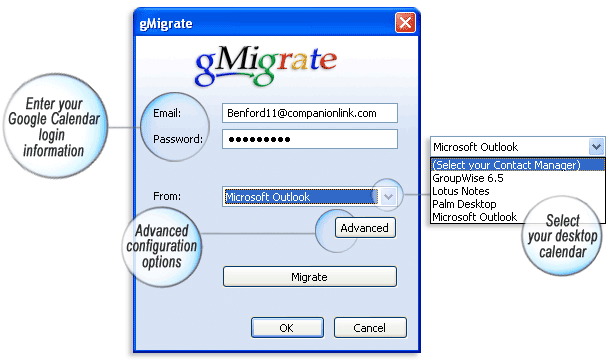
Sync your calendar to gmail
I just downloaded and tested this cool application that will synchronizes your email calendar to your gmail calender. You can read about their software at http://www.companionlink.com/ I am using the free gMigrate and it works well.
Tuesday, March 20, 2007
Mobile or is it a Laptop
Your mobile phone can be a personal computer in the near future. And that is not going to be a big surprise. Just take a look at the features that mobile phones have now and compare these mobile phones to the versions of yesteryears. You would see just how fast things are developing.

At present, many mobile phone manufacturers are already into that challenge. If you know about the HTC mobile phone from Advantage, it looks like a small laptop but you can fold it up and use it as a phone. And at Cebit T-Mobile from Germany showed off its Ameo which is a mobile phone with a screen measuring 13 centimeters and comes with a drive with 8 gigabytes. The time has come that mobile phones have turned into PCs, I do not mind it at all.

Saturday, March 17, 2007
WM to support USB host

Seiko Epson Corp. (Epson) is developing sample Windows CE 6.0 drivers for its S1R72V family of high-speed USB2.0-compatible controller chips. The first such driver, for the S1R72V17 controller chip, is now available, the company says.The S1R72V17 is a low-power USB2.0 interface controller that implements both host and device functions. The device supports USB2.0 data transfer rates of "HS" (480 Mbps), "FS" (12 Mbps), and "LS" (1.5 Mbps), for both host and device function operation, according to Epson.This sample driver is unique in that it can be connected to a mouse, keyboard, hub, and to storage equipment in order to effortlessly set up a development environment on a CEPC device, eliminating the need to establish a specialized development platform environment. By launching this new sample driver for Windows(R) Embedded CE 6.0, Epson has further expanded its lineup of sample drivers for USB controller LSI products in an effort to support customers in their development activities.
Key features of the driver, as listed by Epson, include:
1) USB2.0 host functions
- Supports HS (480 Mbps), FS (12 Mbps), and LS (1.5 Mbps) transfer rates
- Supports control, bulk, and interrupt transfer
- Compatible with CEPC PCI bus
- Compatible with test mode
- Supports multichannel
- Supports mass storage class
- Supports hubs (compatible with multistage connection)
- Supports HID
- Supports CDC
2) USB2.0 device functions
- Supports HS (480 Mbps), FS (12 Mbps), and LS (1.5 Mbps) transfer rates
- Supports control, bulk, interrupt, and isochronous transfer
- Supports Endpoint 0 in addition to five general Endpoints (for bulk/interrupt/isochronous transfer)
- Compatible with CEPC PCI bus
- Compatible with test mode
- Supports serial class (ActiveSync can be used)
- Supports mass storage class
TiVo Launches Remote Scheduling With Verizon Wireless
TiVo and Verizon Wireless today announced the availability of TiVo Mobile scheduling, a downloadable application available only through Verizon Wireless.TiVo Mobile scheduling allows subscribers to purchase the mobile service through select Verizon Wireless handsets and schedule recordings on their TiVo Series2 or Series3 TiVo boxes.
TiVo and Verizon Wireless bring consumers the convenience of scheduling television recordings while away from the living room. Whether you are away from home or discussing TV at the water cooler, all that is needed is a select Verizon Wireless Get It Now-enabled handset to schedule recordings on your TiVo box.
TiVo Mobile scheduling uses the award-winning TiVo interface to give subscribers the ability to easily search for and browse through listings to find shows that they want to record. Subscribers to the TiVo Mobile scheduling service will also have access to premium entertainment content that is updated daily, including a customizable channel lineup, the most popular and most recorded shows and a current list of recommendations from TiVo.
TiVo and Verizon Wireless bring consumers the convenience of scheduling television recordings while away from the living room. Whether you are away from home or discussing TV at the water cooler, all that is needed is a select Verizon Wireless Get It Now-enabled handset to schedule recordings on your TiVo box.
TiVo Mobile scheduling uses the award-winning TiVo interface to give subscribers the ability to easily search for and browse through listings to find shows that they want to record. Subscribers to the TiVo Mobile scheduling service will also have access to premium entertainment content that is updated daily, including a customizable channel lineup, the most popular and most recorded shows and a current list of recommendations from TiVo.
Nokia steps closer to to WIMAX network in the USA
Since the announcement in January, things look to be moving fast as they have announced that "Sprint Nextel has awarded it the four Texas markets of Dallas, Fort Worth, San Antonio and Austin for the initial build-out of Sprint Nextel's mobile WiMAX network."
"Nokia will deploy WiMAX infrastructure, including the Nokia Flexi WiMAX Base Station, at sites throughout the four Texas markets, enabling Sprint Nextel to deliver wireless Internet broadband access to consumers, businesses and governments. Service is expected to commence in the Texas markets during the first half of 2008. Sprint Nextel's mobile WiMAX network intends to cover 100 million people nationwide by the end of 2008."
Link
"Nokia will deploy WiMAX infrastructure, including the Nokia Flexi WiMAX Base Station, at sites throughout the four Texas markets, enabling Sprint Nextel to deliver wireless Internet broadband access to consumers, businesses and governments. Service is expected to commence in the Texas markets during the first half of 2008. Sprint Nextel's mobile WiMAX network intends to cover 100 million people nationwide by the end of 2008."
Link
Saturday, March 10, 2007
gSyncit for Microsoft Outlook
gSyncit works by updating your Microsoft Outlook calendar with your Google calendar entries and then updating your Google calendar with your Microsoft Outlook entries. All appointments that occurred in the past 365 days and those that will occur in the next 365 days will be synchronized
Link
Link
Wednesday, March 07, 2007
Windows Mobile 6 SDK Now Available for Download
"The Windows Mobile 6 SDKs add documentation, sample code, header and library files, emulator images and tools to Visual Studio that let you build applications for Windows Mobile 6. With Windows Mobile 6, we are revising our SKU taxonomy and naming to better align our brand and products with the realities of today’s mobile device marketplace. The historical form-factor based distinction between Windows Mobile powered Smartphone and Windows Mobile powered Pocket PC Phone Edition is blurring dramatically. We want our taxonomies and terminology to evolve to better reflect the evolution of the mobile device industry."
link
link
Google released a Google Maps client for Windows Mobile
Google released a Google Maps client for Windows Mobile that installs from a CAB file that can be downloaded and installed directly from Google (no need to sync with a PC). It is also a native application. No Java Midlet needed. This means it is fast and looks good on a Windows Mobile device. I tested it and the satellite image view looks nice and clear on its screen and the menu looks like most other native applications.
You can download it directly to your device from: http://google.com/gmm/
The application can also show a traditional looking street map, locations of businesses, real-time traffic for certain cities, and driving directions. I’m very impressed by what I’ve seen. I hope we see more native Windows Mobile apps from Google in the future.
Wednesday, February 28, 2007
E-mail best practices
These days, e-mail is used by just about everyone. Unfortunately, a lot of users out there don't use it right, flirting with security risks, consuming excessive bandwidth, and practicing lousy etiquette. Here are some basic e-mail usage guidelines to help your users handle their e-mail responsibly and to safeguard your organisation.
1. Prevent virus outbreaks and spam
Viruses are often spread through e-mail. You can greatly reduce the spread of e-mail viruses by using antivirus software, using only e-mail services that offer automatic antivirus protection (such as AOL, Google, Hotmail, and Yahoo), opening e-mail only from trusted sources, opening only attachments you're expecting, and scanning attached files with antivirus software before opening them.
Spam is loosely defined as unsolicited bulk e-mail and loosely correlates to the junk mail that turns up in your home mailbox. But spam represents more than unwanted clutter. It clogs e-mail accounts -- and networks and servers -- while trying to sell products, spread jokes, or propagate Internet hoaxes.
Reduce the amount of spam you receive by being cautious where you post your e-mail address. Avoid publishing your e-mail address on Web sites or submitting it to every site or organisation that requests it.
Never forward chain messages, which often reveal coworkers' and colleagues' e-mail addresses to other parties. Use caution when accepting e-mail offers or agreeing to accept mailings from vendors; subscribe only to Web sites and newsletters you really need and consider creating a generic Hotmail or Yahoo e-mail account for these subscriptions.
Don't open unsolicited e-mail. If you accidentally open spam, don't click links offering to unsubscribe or remove you from the mailing list unless the sender is a trusted vendor.
2. Avoid phishing attacks
Phishing scams are designed to steal consumers' personal information. They often use doctored and fraudulent e-mail messages to trick recipients into divulging private information, such as credit card numbers, account usernames, passwords, and even tax file information.
Online banking and e-commerce are generally safe, but you should always be careful about divulging personal and corporate information over the Internet. Phishing messages often boast real logos and appear to have come from the actual organisation, but those messages are frequently nothing more than copyright infringements and faked addresses. If you suspect a message possesses any credibility, you are much safer calling the company directly -- preferably at a telephone number printed on a paper statement or invoice -- and talking to an authorised representative.
3. Manage your Inbox
Sort messages by priority, subject, date, sender, and other options to help find important e-mail that requires your attention. Proper e-mail etiquette dictates that you respond to all e-mail in a timely fashion. Generally speaking, you should respond to all professional e-mail within a business day, even if it's just to say you've received the message and will look into the matter. Occasionally, you may receive an e-mail thread that contains responses from several people; always read the entire thread before responding.
4. Compose professional messages
It's easy to convey the impression that you're unprofessional or careless if you don't follow some basic principles of good business writing. Make sure you follow proper grammar and sentence structure when composing and responding to messages and use a spell checker. Don't type in all capital letters -- it creates the effect of shouting. Break your message into paragraphs for logic and readability.
Before clicking the Send button, give it a final once-over. Reread the entire e-mail, checking it for grammatical errors, punctuation mistakes, and typos. You'll be amazed at what you catch. Also make sure your tone is appropriate for the message.
5. Write effective subject lines
Writing subject lines can be tricky, but you should always include one. The goal is to summarise the message without being too wordy or too vague. Long subjects tend to be skimmed or ignored, and they don't always fully display in e-mail viewers. For best readability, use sentence case for subject lines rather than all caps:
Agenda for meeting on 3/29/07
Not
AGENDA FOR MEETING ON 3/29/07
6. Properly use CC and BCC
The carbon copy (CC) and blind carbon copy (BCC) features found in most e-mail clients allow you to send copies of an e-mail to others you need to keep informed but who aren't necessarily the primary recipients.
When copying others, be certain the e-mail message pertains to them. If you use e-mail address lists, verify that all of the members of the list should receive the e-mail, too, and remove those who don't need to be included. And use the BCC feature sparingly. If sensitive topics require BCCing others, it may be best to take the matter offline and discuss it in person.
7. Obey etiquette rules when forwarding messages
Before you forward an e-mail, make sure that all recipients need to receive the message. In addition, be careful when forwarding sensitive or confidential information. Never forward proprietary information to external audiences or to unauthorised recipients. Before clicking the Send button, review whether a message's contents are appropriate for each listed recipient.
8. Don't be a party to a flame war
Flame wars are heated e-mail exchanges that are more emotional than reasoned, and they have no place in professional communications. If you receive a flame or suddenly find yourself in a flame war, take a little time before responding, if you respond at all. Think about the situation and reply rationally not emotionally.
You may also decide not to reply but to deal with the issue in person. Often, flame wars are started because of a simple misunderstanding. An ill-phrased comment (or even a well phrased one) can be misconstrued by a recipient, who then fires off a salvo in response. Instead of replying, go talk to the person and discuss the message. If talking with the person doesn't end the problem, involve a manager for assistance in resolving the issue offline.
9. Protect e-mail addresses
Don't divulge your coworkers' e-mail addresses to vendors, friends, or others outside the organisation. Verify that recipients listed in the To and CC fields should be receiving messages and that you won't be revealing others' e-mail addresses in the process. Don't post your or coworkers' e-mail addresses on Internet forums or bulletin boards, on Usenet groups, in chat rooms, or in other public areas.
Here are a couple of simple ways to help keep others' e-mail addresses private. First, use the BCC feature when you need to hide their e-mail addresses from external audiences. Second, delete their addresses from messages you forward. It takes only a few moments and will reduce the chances of coworkers' e-mail addresses proliferating in the wild.
10. Be smart about handling attachments
E-mail attachments consume inordinate amounts of e-mail server space and network bandwidth and are often the culprits behind virus outbreaks -- but they're often the easiest way to transfer files. Just be sure to follow these guidelines when e-mailing attachments:
- Don't attach large files to an e-mail; anything over one or two megabytes shouldn't be sent via e-mail.
- Limit the number of files you attach to a message to five or fewer.
- Save attachments to your hard drive and then delete the e-mail message containing the attachment.
- Don't open unexpected attachments or those sent by unknown parties.
- Always scan files with an antivirus program before opening an attachment. Never click an attachment without first confirming that it's virus-free.
- Don't annoy recipients by forwarding attachments they can't access. If an attachment requires a new or less-common application, say so in your message.
11. Don't include sensitive or potentially embarrassing information
Don't make the mistake of thinking your e-mails are private. They're not. Think of them as postcards. You should never include any information in an e-mail that you wouldn't want published on the front page of your local newspaper. In other words, never send confidential, proprietary, sensitive, personal, or classified information through e-mail. You should also refrain from making inflammatory, emotionally charged comments in e-mail.
12. Know when to use e-mail (and when not to)
Businesses provide e-mail for professional, business-related use, not for jokes, gossip, or chain e-mails. Also remember that you shouldn't send an e-mail to do a conversation's work. Complicated subjects are often difficult to explain face to face, much less in an e-mail. Instead of firing off a complicated explanation via e-mail, set up a short meeting to address the issue in person.
E-mail is also a poor stand-in for conversation when conducting critical, difficult, and/or unpleasant discussions, such as issues related to human resources matters. Touchy communications are best handled in person.
Friday, February 23, 2007
Steps to create better meeting
Given our love for meetings, we need to make them more effective. Having recently “enjoyed” several truly pointless meetings, I know there’s a better way.
- Make sure the meeting has a clear purpose. If I could scream this, I would: “What is the purpose of this meeting?” If you can’t define the purpose clearly, or you’re obfuscating it in order to get me into the meeting then shame on you.
- Avoid suspense. There’s no place in meetings for suspense. Whether you’re delivering bad news or good news - just get to the point. You can explain all the circumstances of your news after the fact, but don’t keep people sitting around waiting.
- Document what’s going on. The best thing about a meeting is not remembering what was talked about 5 minutes after it was finished. I suppose to avoid pointless meetings I could say, “be remarkable and memorable” but barring that, pick one person as secretary and have them distribute their notes later on.
- Avoid distractions. Every meeting has at least one guy that’s distracted by something. He’s looking at his computer screen, staring out the window, signaling to people walking by the conference room, or picking his nose. Boot his butt out of there, he’s Mr. Pointless Meeting.
- Have an agenda. This won’t work for impromptu meetings, but an agenda is a very good way to keep people on track. Distribute it beforehand. Don’t ask for everyone’s approval. If you do, and don’t get it, you’ll have a harder time following the agenda. Agendas are an opt-out effort; if someone doesn’t put in suggestions or request changes (or respond in any way) they’ve - by default - accepted the agenda.
- Avoid regular meetings if there’s no agenda. Following point #4, if you’re having a regular, weekly meeting but there’s no agenda, why have the meeting? If you say “habit” then poke yourself in the eye. Meetings aren’t meant to satisfy your need for organization and habitual, mindless behaviors; they’re there to solve problems.
- Schedule something critical right after. If you have the sense that a meeting may be pointless schedule something important right after. Tell the attendees as soon as you get in there, so you’ve got an escape route setup. You could always fake it, or even have someone call you during the meeting to get out, but it’s much more effective if you legitimately have to move on. It’ll help you keep others focused, moving through the agenda and accomplishing something.
Wireless doorbell rings you in
After testing the technology in its home Dutch market, wireless startup Waleli now plans to sell its GSM Doorbell internationally, beginning in northern Europe, the company said Tuesday.
Link
The wireless doorbell allows apartment dwellers, home owners, and small businesses to answer their doorbell, talk to visitors, and even open the door remotely with their GSM phones.
The GSM Doorbell consists of four parts: an intercom, an electronic lock, a GSM-enabled doorbell, and a SIM (subscriber identification module) for the GSM device.
When someone presses the doorbell device, it rings your handset, allowing you to communicate with visitors and, by entering a pincode, to grant them access to your home, all without having to leave your location.
The technology can be useful when dealing with delivery people, door-to-door solicitors, and many others who need or want to stop by. And you don't have to worry about locking yourself out of the house or apartment again because the machine will recognize your mobile's number and unlock the door for youLink
Wednesday, February 21, 2007
Google VP: Mobile phones the future of the Internet
The future growth of the Internet lies in the hands of mobile phone users, not computers, according to Google Vice President Vinton Cerf. Speaking in Bangalore, India this morning, Cerf said to reporters that while the Internet population has exploded from 50 million to 1.1 billion since 1997, it still only reaches a sixth of the world's population.
The only way to reach the remaining 5.5 billion people on the planet will be to make it more affordable to access the Internet, according to Cerf. Internet access via mobile phone has been slowly gaining momentum in developed countries—over 50 percent of those surveyed toward the end of 2005 had used at least one data service on their phones. However, such mobile access could be the key to quickly getting large populations in developing countries online due of the marginal cost of a mobile phone compared to a computer.
Friday, February 16, 2007
Explore the world with free maps on your mobile
A nice software offering from Nokia, the charging model will be in conjunction with operators, they will charge a subscription for turn-by-turn directions.
Link
Link
Friday, January 26, 2007
Vista Windows Mobiles Device Center Walk Through
Chris Leckness is walking us through the Windows Mobile Device Center in Windows Vista.
Link
link to device centre Software
Link
link to device centre Software
Thursday, January 25, 2007
Free Ebooks
There are approximately 550 digital libraries separated alphabetically and by category, with over 500,000 unique ebooks
Link
Link
Tuesday, January 09, 2007
Microvision To Demonstrate Breakthrough Ultra-Miniature “Thin Mint” Candy Sized Projection Display for Mobiles

Company Microvision to Unveil Tiny Display Module During Consumer Electronics Show in Las Vegas
REDMOND, Wash.--(BUSINESS WIRE)--Microvision (NASDAQ:MVIS), the global leader in light scanning technologies for display and imaging products, announced today that it will unveil and demonstrate during the Consumer Electronics Show in Las Vegas an ultra-thin, miniature full-color projection display that is small enough to be embedded in portable hand-held devices including mobile phones. The miniature projection display prototype, based on Microvision’s proprietary Integrated Photonics Module (IPM), has been developed in collaboration with one of the Company’s high volume manufacturing partners to position Microvision to deliver mobile users worldwide a large screen viewing experience inside a thin and sleek portable package. “Small, two inch displays that are common to mobile devices such as cell phones are barriers to growth of exciting mobility markets, because they limit the user viewing experience,” said Alexander Tokman, President and CEO of Microvision. “Our projection display solution is expected to eliminate this bottleneck, benefiting consumers, mobile operators, content providers, and consumer electronics OEMs. As our display is further optimized for high volume manufacturing, OEMs are expected to create a new generation of mobile devices with powerful projection display capabilities. Content providers should benefit by expanding their portfolio of visually rich content and application services. Mobile operators should benefit from an enhanced user experience by increased adoption of mobile data services such as mobile TV. Consumers should be able to obtain a radically new viewing experience by projecting photos, videos, movies, and TV from personal mobile devices onto virtually any surface for entertaining and sharing with friends and family -- whenever, wherever.” The image produced by Microvision’s display is extremely sharp and vivid whether being projected to view an image the size of a laptop screen or further away to view an image the size of a big screen plasma TV. Currently measuring a slim 8 mm this extremely small display package, about the size of a “thin mint” chocolate candy or the generation two iPod® shuffle, has been dramatically miniaturized to 1/10 the size of the company’s original prototype shown in June 2006 at the Society for Information Display. The Company and its high volume manufacturing partners will continue to develop this exciting technology into products that are expected to meet very aggressive market requirements for size, power, cost, and performance. Microvision plans to demonstrate the projection display prototype at private showings for prospective global OEM customers, members of the media and institutional investors during the 2007 Consumer Electronics Show in Las Vegas, January 7 – 11. The company is showcasing how its display could be embedded directly into a device like a mobile phone, as well as be used as a standalone accessory display with a variety of mobile devices. “This development represents a major milestone in the company’s turnaround and growth strategy set in place in 2006,” – concluded Tokman. “Our product development team has done an outstanding job and we believe that our customers and partners will be delighted by what we have to show during CES.”

Internet Tablet Nokia N800
The Nokia N800 is the follow-up to the Nokia 770 Internet Tablet, building on the Maemo Linux platform developed by Nokia. The N800 uses the third incarnation of Maemo, called the Internet Tablet OS 2007 edition which adds a few new features to the 2006 edition (which in itself was a huge improvement over the original platform).
It's roughly the same size as its predecessor - the Nokia N800 measures 75x144x13mm and weighs 206 grams. The 770 was 230 grams in its protective case, and 185 grams without it. The N800 shares the same excelled 800x480 pixel display of its predecessor.. this is a very high resolution display that puts the competition to shame. The N800 adds a webcam plus improvements to the tablet's WiFi and Bluetooth implementation. One key weakness of the old 770 was a lack of internal memory, and this has been increased in the N800. The N800 also accepts a wide variety of memory cards, including RS-MMS, miniSD, microSD and MMCmobile units, which gives a great deal of flexibility. One nice touch is that the N800 has an integrated stand, one of the first things that got lost on the older 770. It's important to note that the Nokia N800 isn't a phone, although it will support Skype in the future. Connectivity is either through the N800's WLAN adapter, or via a Bluetooth phone. The 770 wasn't limited to Nokia phones either, so you should be able to use just about any Bluetooth handset with the N800, including 3G, EV-DO and HSDPA phones.
The range of software available now and in the future for the Nokia N800 demostrates clearly that this is an ultra-compact computer. There's a version of the Opera web browser, an email client, RSS newsreader, multimedia player, games plus a range of utilities and other applications. It will also be possible to use the N800 with a GPS receiver as a satellite navigation system.
The Nokia N800 has different looks too - the 770 was a bit "retro futuristic", the N800 is more polished and contemporary. Either way, both Nokia internet tablets have plenty of "wow" factor.. especially when people see the quality of the display.
You could regard the Nokia N800 as "version 2.0" of the Nokia Internet Tablet. The original version of the 770 had plenty of rough edges (call it "version 1.0") which were largely fixed by the 2006 OS (call it "version 1.1"). Perhaps the N800 will be polished enough to make it a proper consumer product, whereas the old 770 was really for enthusiasts.
The Nokia N800 is available now in the US and soon in certain European markets at around €400 / US$400
Friday, December 22, 2006
China to Make USB the Standard for Cellphone Charging
China is moving to standardize all cellular phones sold in the country to using the USB port for charging. The thought is that having one charger for every brand of cell phone will make it easier for consumers. It will make it easier on consumers, but cut into the profits for he accessory makers. I would imagine that if China standardizes to USB, we will likely see all cellular phones going to the same standard. However, China has set no date at which they will begin enforcing the standard.
Tuesday, December 19, 2006
Videos explore Windows Embedded CE 6
Break out the popcorn, sit back, relax, and enjoy the following videos, which are located in the MSDN "Channel 9" area:
More Training
- What’s New in the Windows CE 6 Beta Platform Builder Tools -- Jonathan Lyons, program manager on the CE 6.0 Platform Builder IDE Team walks through the process of bringing up an OS design for a device, adding an application, and customizing the application using the new Platform Builder Tools in Visual Studio 2005. This is a 2-parter with Part 2 here.
- Driver Development and Much More With Mike Calligaro -- In addition to discussing Windows CE device drivers, Calligaro reminices about his 13-year career at Microsoft including work on the Sega Dreamcast, an early attempt at video-on-demand.
- Understanding the Primary OEM Performance Tools -- Sue Loh, Software Design Engineer on the Platform Builder Remote Tools Team, discusses the two most important performance tools for Windows CE OEMs -- the kernel profiler and CeLog / Remote Kernel Tracker. Some familiarity with the tools is assumed as the discussion focuses on the relationship between the two.
- Collecting Thread Data Without Remote Kernel Tracker -- Sue Loh shows how to collect CeLog threading data without a connection to Remote Kernel Tracker. This is a core method for collecting performance data on a standalone device. She also shows how to look at the data using a command-line parsing tool, readlog.
- Analyzing Physical and Virtual Memory Usage Using Control Window Commands -- Sue Loh again, this time demonstrating how to look at virtual and physical memory usage on a device using control window commands. Loh uses the Target Control Window to examine memory usage, and explains how to read memory dumps.
- Application Compatibility -- Migrating Windows CE 5.0 Application to Windows Embedded CE 6.0 -- Senior Technical Product Manager Mike Hall demonstrates the new Application Compatibility Tool. The CEAppCompat Tool reads executables and device drivers, and provides HTML results showing which called APIs are no longer supported in CE 6.0, APIs that are only supported in the kernel, and APIs that may not be supported in the future.
- Managed Application development for Windows Embedded CE 6.0 -- Mike Hall demonstrates how to configure a baseline CE 6.0 operating system (OS) image and then add the components needed to support a managed application within Visual Studio 2005 as the application development tool. Hall shows how to get an IP address and then configure Visual Studio 2005 to deploy an application to the running OS image.
More Training
Wednesday, December 13, 2006
Google Cheat Sheet
Google's Cheat Sheet helps unlock tools not normally known about this revolutionary search engine.
3000+ Unix/Linux Programming Texts and Tutorials
All free, of course. Includes the typical roundup of Linux/Unix languages, also includes things like cron, openGL, networking, GTK, Gimp, iptables, regex, Grub/LILO, booting between multiple kernels and a plethora of others.
Link
Link
How to Turn an Ordinary Photo Into an Extraordinary Photo
A simple Photoshop tutorial that will show you how to liven up an old image and transform it from ordinary picture to an Extraordinary photo!
Integrated Photonics Module Brings Big Screens to Mobiles
It will be handy to project your Smartphone screen on the nearest wall. MicroVisions PicoP is just the thing. Nice for editing email and business presentations. Just add the i.tech Virtual KB, and you have the next generation phone.
Biz Link
Blog Link
Biz Link
Blog Link
Understanding Mobile 2.0
Written by Rudy De Waele of m-trends.org and edited by Richard MacManus. This kicks off a mini-series of posts on the topic of Mobile 2.0.
Link
Link
Microsoft begins private beta of VoIP server
Microsoft today opened a private beta of its new enterprise voice communications server , Microsoft Office Communications Server 2007, to 2,500 IT professionals. The new server is aimed at allowing companies to integrate voice over Internet protocol (VoIP) technology into existing telephony infrastructure and is the successor to Microsoft Live Communications Server 2005.
MOTOROKR E6
Motorola has announced it’s about to start shipping its new MOTOROKR E6. The MOTOROKR E6 will offer RealPlayer music library synchronization on your PC and a built-in FM radio to keep you entertained plus full-size SD card support. Moto is also touting the phone’s PDA-like capabilities including business card reader, POP3 email capability, doc viewer for Word and Excel files and a nice big juicy 2.4 inch touch screen display, stylus included. (No WiFi or 3G capabilities apparently.)
Wednesday, December 06, 2006
Crossloop Simple Secure Screen Sharing
I just found this on the net looks like a good tool to support remote pcs
www.crossloop.com/index.html
# Connect Any Two PCs on Earth
# Simple, Easy-To-Use Interface
# Fully Encrypted Help Sessions
# Works through Firewalls and NAT
# Secure Screen Sharing in under Sixty Seconds
link
www.crossloop.com/index.html
# Connect Any Two PCs on Earth
# Simple, Easy-To-Use Interface
# Fully Encrypted Help Sessions
# Works through Firewalls and NAT
# Secure Screen Sharing in under Sixty Seconds
link
Sunday, December 03, 2006
Windows Embedded CE 6.0 documentation online
Microsoft's MSDN developer website is hosting an extensive collection of Windows Embedded CE 6.0 documentation online. The series begins with a thorough introduction to CE 6.0 that reviews the kernel architecture and what's new in this latest release. Subsequent articles cover application and driver development, hardware platform bring-up, and more.
Link
Link
Friday, November 24, 2006
Open-Source OS DAP runs Skype
Linux is spreading, and the latest thing it has found its way into is the entertainingly-named Wizpy DAP from TurboLinux. Running a brand of the open-source OS called FUJI, not only is the Wizpy good for playing all your mp3. Out of the box you get Firefox, Thunderbird and Skype
Link
Link
Saturday, November 18, 2006
3 Group, Slingbox Bring Mobile TV to the UK with X-Series
Imagine a mobile solution that wrapped the power of the Slingbox, unlimited Skype calling, broadband Internet, Google Search, Yahoo Messenger, Orb PC access, and more into a single mobile handset. Sounds good doesn't it? Well, this is no pipe dream... the X-Series from 3 does all this and more, and the UK is getting it first...
Link
Link
Thursday, November 16, 2006
Smartphones get a firewall
Trend Micro has a new version of its mobile security software out. Imaginatively named Trend Micro Mobile Security 3.0, it adds a firewall and intrusion detection software - the previous version was antivirus and antispam only.
V3 will only run on the latest Windows Mobile 5 and Symbian 9.1 systems though, the rationale being that as the market grows so fast, they will be the bulk of malware-targeted systems very soon.
LinkWednesday, November 15, 2006
Microsoft Readies IT Customers for Windows Vista
Links galore. Microsoft details new offerings to deliver increased business value for customers through next-generation product
read more
read more
PowerShell: Microsoft releases a new Windows Command Prompt
Microsoft Windows PowerShell command line shell and scripting language helps IT Professionals achieve greater productivity. Using a new admin-focused scripting language, more than 130 standard command line tools, and consistent syntax and utilities, Windows PowerShell allows IT Professionals to more easily control system administration.
read more
read more
Tuesday, November 14, 2006

Chinese mobile manufacturer, Yulong Computer Telecommunication Scientific Co., has announced that it wants to bring its dual-mode handsets to India. The dual-mode handsets can let you use two SIM cards (i.e. two different phone numbers) simultaneously in one phone. Yes! two different numbers at the same time in the same phone, without having to restart the phone or swap SIM cards!
The CoolPAD 728 (CDMA+GSM) and 728 G2 (GSM+GSM) both feature Windows CE, a 240x320 QVGA display with a touch-screen interface, upto 2.0 megapixel digital camera, MP3/WMV and streaming media, 3D stereo speakers, 128MB ROM and 64MB RAM with a miniSD expansion option, and the usual set of Windows-based mobile applications. However, Bluetooth or Infrared are conspicuously absent from the feature listing on the website. These phones are already on sale in China, having sold a combined total of 2,30,000 units of the most popular CDMA+GSM models
Monday, November 13, 2006
TinyTube enables YouTube playback on your mobile
Point your cellphone's browser to TinyTube, it is not accessible from a non-mobile device, the site provides a scaled-down version of YouTube for quicker loading and less strain on your wireless resources, and offers up "low, medium, and high" playback settings to cater to varying connection speeds. So if you're the type who enjoy the free things in life, hit the link.
Wednesday, November 08, 2006
E61 and Nokia podcast software
Just setup the E61 with the podcast software, so far it looks good. The default links are a bit lame but using the E61 KB I was able to a few that I liked. What I do like is the software shows how long ago the MP3 was uploaded. I have made the software a link on my desktop, so it is quick and easy to get to. I set the web application to prompt me for access point so i will be asked if I want to use 3G or WIFI.
Using the WIFI connection the 10-20 Mb files still take time to down load, but hey this is why I like mobile phone technology, here I am downloading MP3 files via a phone menu using a WIFI connection in my house.
Link
what I listen to http://www.sydphoto.com/my.opml
Using the WIFI connection the 10-20 Mb files still take time to down load, but hey this is why I like mobile phone technology, here I am downloading MP3 files via a phone menu using a WIFI connection in my house.
Link
what I listen to http://www.sydphoto.com/my.opml
Tuesday, November 07, 2006
Sunday, November 05, 2006
Motorola Follow Me TV solution
Motorola on Nov. 2 launched an upgrade to its Follow Me TV digital video recording device that allows users to create a network to send content to other rooms in a home, and also lets mobile devices with storage-card capacity record programs from anywhere.
John Burke, corporate vice president and general manager of digital video solutions for Motorola said, "There are more programs, more channels and as a result, we wanted to give consumers the opportunity to control what they watch and where they watch it."
The device is designed to work seamlessly with Motorola's Razr phones, according to Burke. Motorola uses a "save to mobile" option on its DVR menu to activate the feature. The Razr phone will then search for the desired programs and use the GPRS to communicate to the DVR what shows to record.
"This device is a Java-based application and will soon work with all mobile phones," Kalia Farrell, a Motorola spokesperson. "We are currently looking to see which phone services will work with us."
Link
John Burke, corporate vice president and general manager of digital video solutions for Motorola said, "There are more programs, more channels and as a result, we wanted to give consumers the opportunity to control what they watch and where they watch it."
The device is designed to work seamlessly with Motorola's Razr phones, according to Burke. Motorola uses a "save to mobile" option on its DVR menu to activate the feature. The Razr phone will then search for the desired programs and use the GPRS to communicate to the DVR what shows to record.
"This device is a Java-based application and will soon work with all mobile phones," Kalia Farrell, a Motorola spokesperson. "We are currently looking to see which phone services will work with us."
Link
Thursday, November 02, 2006
Free ring tones just do a survey
Thank you for taking part in the survey. Your answers are of great value to
link
WM phone users revolt
The results of Information week poll are in. They asked readers what the most frustrating thing about smartphones is, and over 30% say it's battery life. Most smartphones work fine until you try to access an application or download a graphic from the Web. Working in applications will suck the life out of a battery faster than you can type "supercalifragilisticexpialidocious" on that tiny keyboard. Twenty-three percent say the small screen size on a smartphone is frustrating, followed by 21% who are dissatisfied with wireless broadband speeds and 20% with the voice quality. "Despite all their advanced features, some [smartphones] perform poorly as phones. That's the main reason I have one, to make and received calls," says one respondent.
Some other common complaints include:
- The high cost of devices and wireless data services that are still not as fast or as cheap as cable or DSL.
- Processor speed, which becomes an issue as companies look to use smartphones to replace laptops and want to load custom applications or extend current apps to the devices.
- The need for more robust browsers that will allow the use of hosted applications.
And the award for The Operating System With The Most Issues goes to Windows Mobile 5.0. The popular OS has a tendency to lock up often and requires users to reboot their smartphones. "The fact that the 'close' button doesn't actually close the application but just minimizes it has been a shortcoming since day one," says one Windows Mobile user. Very few of the applications in Windows Mobile cooperate in sharing data, meaning the applications don't interoperate. "The easiest way to make a calendar appointment with someone whose information is in your contact list, is to jot down (paper and pen) the appropriate information (phone number or address), then calendarize the event," says another user.
On line radio recording
I have just started to use Screamer radio to record my streams. Easy to setup and comes already configured to get streams. Nice and small install. I recommend it.
10 things you should know about Internet Explorer 7 Security
Internet Explorer 7 is designed to make browsing safer. Here's a quick rundown of some of the new security features, including Active X opt-in, the Phishing Filter, cross-domain security, enhanced privacy protection, and an international character alert.
read more
read more
12 apps for palm pdas
Your Palm PDA can do a lot more than just contact and calendar management. Load it with the right software and it can play music, stream RSS feeds, keep you entertained on the road, and even get you where you're going.
read more
read more
Pimp my mobile: 33 ways to upgrade a cell phone
Want to enhance your mobile experience? Here are 33 ways to have a lot more fun with cell phones. #6 Get mobile VoIP. #19 Make a custom skin. #25 Upload videos to YouTube. #32 Play Quake.
read more
read more
Wednesday, November 01, 2006
How to Save a Wet Mobile Phone
Ever dropped your Mobile phone in the sink, or even worse the toilet ? Did you ever leave it in your pocket and run it through the washer? It usually means you have to replace your phone, but sometimes if you're fast you can save the phone.
read more
read more
Symbian increases lead in EMEA smart mobile device market
Microsoft’s overall share of the smart mobile device market in Q3 2006 is sitting at 16.9 percent, down from 18.0 percent a year ago. This happened despite shipments of Windows Mobile based converged devices, i.e. smart phones and wireless handhelds, increasing by almost 80 percent year-on-year.
Microsoft, along with Palm, is suffering from the heavy decline is the sales of stand alone PDA’s.
Microsoft, along with Palm, is suffering from the heavy decline is the sales of stand alone PDA’s.
| Symbian increases lead in EMEA smart mobile device market | |||||
| OS vendor | Shipments Q306 | Share, Q306, % | Shipments Q305 | Share, Q305, % | Growth Q306/Q305 |
| Symbian | 5,757,540 | 78.70 % | 5,022,710 | 76.60 % | 14.60 % |
| Microsoft | 1,235,130 | 16.90 % | 1,179,530 | 18.00 % | 4.70 % |
| RIM | 253,420 | 3.50 % | 230,190 | 3.50 % | 10.10 % |
| Others | 73,600 | 1.00 % | 120,420 | 1.80 % | -38.90 % |
| Total | 7,319,690 | 100.00 % | 6,552,850 | 100.00 % | 11.70 % |
Upgrading Nokia Podcasting
These instructions are for users who have previously installed the Beta version of Nokia Podcasting on their S60 3rd edition device.
Download the updated Nokia Podcasting application
Download the updated Nokia Podcasting application
1.If you don't want to preserve your subscribed podcasts and episodes:
a. Uninstall Podcast app from App manager before installing ver 1.00.0.
b. Find the Podcasting icon on your device. (For example, in the MY OWN folder on the N91).
c. Click "Options" and choose "Remove"
d. Install the 1.00.0 version of Nokia Podcasting
2. If you would like to preserve your subscribed podcasts and episodes:
a. Simply install ver 1.00.0 on top of the Beta version, you will see a warning message that ver 0.93.(6) will be replaced by ver 1.00.(0).
b. Select OK to proceed with the installation and use the same location where Beta version is installed when asked where do you want to install ver 1.00.0.
If you are not sure where Beta version was installed, open App Manager and check whether there is a memory icon shown besides Podcast. If yes, your Podcast Beta version is installed on memory card (or hard drive); otherwise, it is installed on phone memory.
3.After upgrading your Podcasting app:
If you did not remove (uninstall) Podcast Beta version before upgrading to ver 1.00.0, you default directories will not be updated to the one comes with ver 1.00.0. In order to show the new default directories, open "Directory" view and select "Restore Default" from the option menu.
Windows Mobile database dev tool
Syware has released a major upgrade to its database and forms development tool for Windows CE and Windows Mobile devices. In particular, Visual CE version 10 includes a "wide range of new functionality" that lets non-programmers create Windows Mobile-based applications, according to the company.
Visual CE 10 includes a macro editor that guides non-programmers through the process of creating well-structured, well-documented macros, according to Syware. Macros can now be totally behind the scenes, kept "tidy and unobtrusive," yet still easily viewed, called, and edited, the company says.
Other features listed as new in version 10 include:
Visual CE 10 includes a macro editor that guides non-programmers through the process of creating well-structured, well-documented macros, according to Syware. Macros can now be totally behind the scenes, kept "tidy and unobtrusive," yet still easily viewed, called, and edited, the company says.
Other features listed as new in version 10 include:
- Support for the Windows CE Universal Camera API
- Custom color capability
- Navigational dropdown lists
- Tap and hold to cut, copy, and paste
- Grid control enhancements
- Field and variable values allowed in messages
- New events -- action, left, right, up, down, or hardware buttons pressed; form start-up; grid column changed; and moving off record
- New commands -- timer and abort
- Development environment enhancements -- control position is displayed; tap and hold creates control; and marquee select enable
Subscribe to:
Comments (Atom)